
UptimeRobot is the default choice for simple, managed uptime monitoring. It is dead simple, it has a genuinely useful free tier, and it covers HTTP, keyword, ping, and port checks out of the box. For “is it up” alerts, it works.
The limit is the same as any pure uptime tool: it tells you something is down, not why. There are no server metrics, no logs, and no cron monitoring, so you end up opening a second tool to investigate every alert. If you want the uptime alert and the server context in one place, Simple Observability bundles uptime, metrics, logs, and cron monitoring at a fixed per-server price.
This article covers the best alternatives to UptimeRobot in 2026. We stay within the uptime and monitoring category, so you will not see enterprise APM platforms here, just tools that solve the same problem UptimeRobot solves. If you are comparing other tools, see our Uptime Kuma alternatives and Better Stack alternatives guides.
Quick summary
| Tool | Best For | Price Model |
|---|---|---|
| Simple Observability | Uptime + metrics + logs + cron | $3 / mo / server |
| Uptime Kuma | Self-hosted uptime | Free (OSS) |
| Pingdom | Polished managed uptime | $15 / mo (10 checks) |
| StatusCake | Managed uptime + SSL + speed | Free / $20+/mo |
| Better Stack | Status pages & on-call | Usage based |
| HetrixTools | Cheap uptime + white-label | Free / $9.95+/mo |
| Upptime | Free, GitHub Actions uptime | Free (OSS) |
| Healthchecks.io | Cron job monitoring | Free / $5+/mo |
UptimeRobot Overview
Known for
UptimeRobot is best known for being the simplest managed uptime monitor. You create a monitor, paste a URL, pick a check type, and you get alerts. The free tier (50 monitors at 5-minute intervals) is generous enough for many small setups.
Key features
- Multiple check types: HTTP, keyword, ping, TCP port.
- Free tier: 50 monitors at 5-minute intervals.
- Status pages: Public status pages on paid plans.
- Notifications: Email, webhook, Slack, Discord, and more.
Why look for an UptimeRobot alternative?
While UptimeRobot is great for simple needs, its scope is narrow.
1. Uptime only, no context
UptimeRobot tells you a host is down. It does not show CPU, disk, memory, or logs, so you open another tool to find out why. The alert and the investigation live in different places.
2. No cron monitoring
Silent cron job failures are a common production problem. UptimeRobot has no concept of ping-based heartbeat checks for scheduled jobs, so you need a separate cron monitor.
3. Free tier limits
The free tier caps monitors at 50 and intervals at 5 minutes, and lacks some notification channels. Teams that grow past those limits hit a paywall that, per monitor, can feel steep compared to per-server pricing.
4. Per-monitor pricing
Paid plans scale by the number of monitors. For a fleet of services and endpoints, that adds up in a way per-server pricing does not.
How to choose an alternative?
When comparing UptimeRobot competitors, focus on what you need around uptime.
- Uptime only or more: If you only need “is it up” alerts, a simple uptime tool is fine. If you want server context, look for a unified platform.
- Pricing unit: Decide whether per-monitor or per-server pricing fits your fleet better.
- Cron monitoring: If scheduled jobs matter, check whether the tool includes cron heartbeats.
- Status pages: Do you need public, branded status pages? Not every alternative offers them.
8 Best UptimeRobot Alternatives
1. Simple Observability
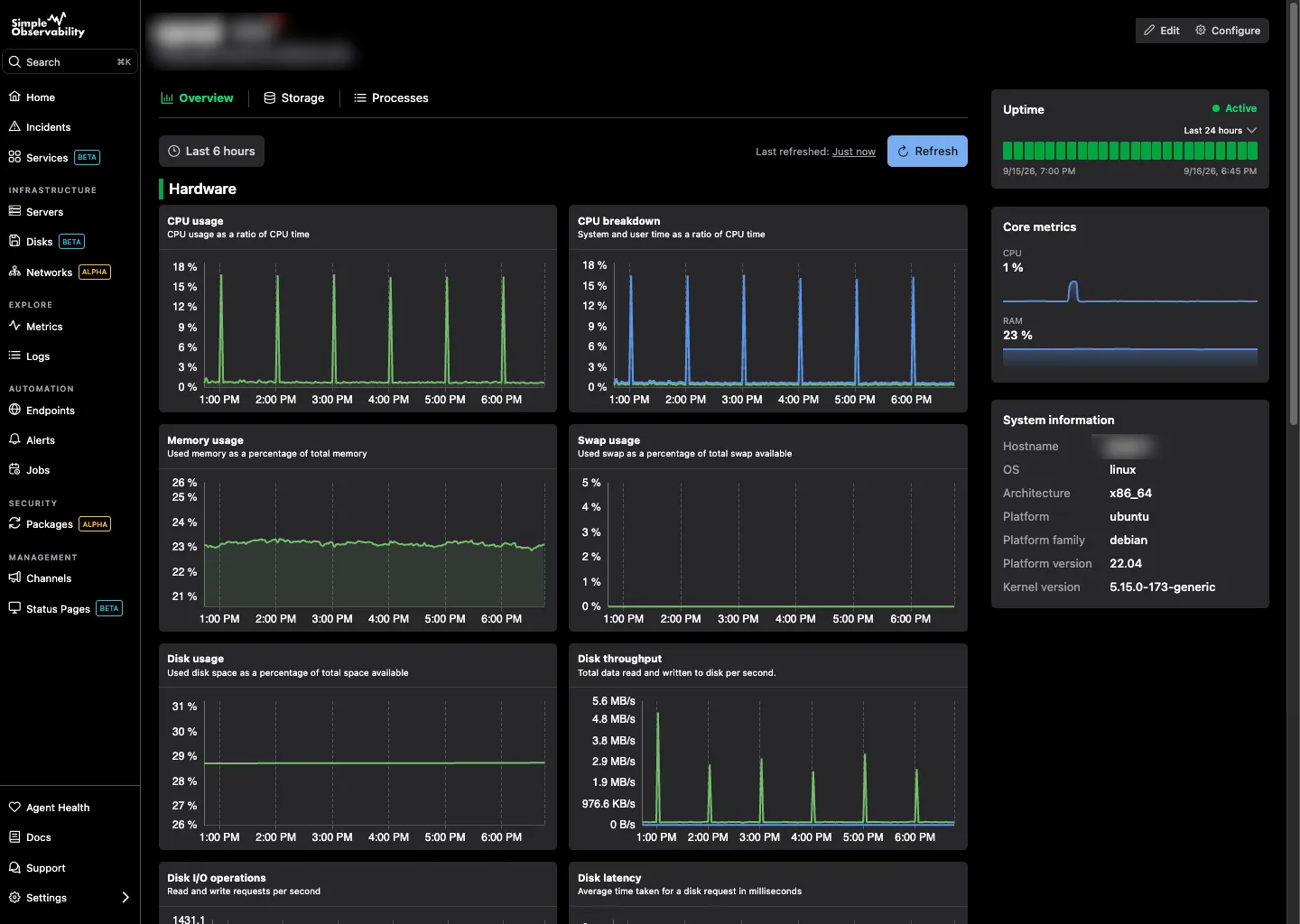
Simple Observability is built for teams that want more than an uptime alert. It combines uptime checks with server metrics, logs, and cron monitoring in one dashboard, hosted externally to your infrastructure, at a fixed per-server price.
Key features
- Uptime + metrics + logs: The alert and the context in one view.
- Cron monitoring: Track execution, duration, and exit codes for scheduled jobs.
- Hosted: The agent pushes data out over HTTPS, no inbound ports.
- Zero-config alerts: Sensible defaults from day one.
Simple Observability vs UptimeRobot Where UptimeRobot charges per monitor and gives you only an up/down alert, Simple Observability charges a flat fee per server and bundles uptime, metrics, logs, and cron monitoring. You get the “why it went down” alongside the “is it up”.
Pros
- All-in-one: Uptime, metrics, logs, and cron in one dashboard.
- Predictable pricing: Flat fee per server, not per monitor.
- Hosted: No infrastructure to run.
Cons
- No public status pages: It does not offer branded status pages like UptimeRobot’s paid plans.
- Not free: UptimeRobot has a free tier; Simple Observability is free for 1 server then $3/server.
Best for: Teams that want the uptime alert and the server context to act on it, in one tool.
Price
- Free: $0 for 1 server.
- Paid: $3/mo per server for unlimited servers.
- Custom: Volume discounts for large fleets.
2. Uptime Kuma
Uptime Kuma is a self-hosted, open-source uptime monitor. It is the self-hosting alternative to UptimeRobot for teams that want full control and no per-monitor pricing.
Key features
- Self-hosted: Runs on your own server via Docker or Node.
- Many monitor types: HTTP, TCP, ping, DNS, container, and push (heartbeat) checks.
- Notifications: A wide range of channels out of the box.
- Status pages: Basic public status pages.
Pros
- Free and open source: No per-monitor pricing.
- Flexible: Supports more check types than UptimeRobot, including push heartbeats.
Cons
- Self-hosted: You maintain the instance, including its own uptime, which is a meaningful failure mode for an uptime tool.
- Uptime only: No metrics, logs, or server context.
Best for: Self-hosters who want a free, controllable uptime monitor.
Price Free (open source).
3. Pingdom
Pingdom is a long-established, managed uptime and performance monitoring service (now part of SolarWinds). It is the closest commercial peer to UptimeRobot, aimed at teams that want a polished SaaS uptime tool.
Key features
- Uptime and transaction checks: HTTP, ping, and multi-step transactions.
- Page speed insights: Real browser performance reports, beyond simple uptime.
- Status pages: Public, branded status pages.
- Alerting: SMS, email, and webhook notifications.
Pros
- Polished and mature: A well-known, enterprise-friendly uptime tool.
- Transaction checks: Multi-step checks that UptimeRobot does not offer on lower tiers.
- Page speed: Adds performance context that pure uptime tools lack.
Cons
- No free tier: Unlike UptimeRobot, Pingdom has no free plan.
- Per-check pricing: The entry plan covers 10 checks, and costs scale per check.
- Uptime only: No server metrics, logs, or cron.
Best for: Teams that want a polished, managed uptime tool with transaction checks and page speed.
Price Starts at around $15/month for 10 checks. Higher tiers add transaction checks and SMS credits.
4. StatusCake
StatusCake is a managed uptime monitoring SaaS with a free tier. It competes directly with UptimeRobot on price, while adding SSL, page-speed, and domain checks.
Key features
- Uptime tests: HTTP, ping, TCP, and SSL checks.
- Page speed and SSL: Built-in speed and certificate monitoring.
- Status pages: Public status pages.
- Free tier: 10 uptime tests at 5-minute intervals.
Pros
- SSL and speed: Covers more than just up/down.
- Managed: No server to run, like UptimeRobot.
Cons
- Interval limits on free: Free tests run at 5-minute intervals; paid plans go down to 1-minute or 30-second intervals.
- Uptime and speed only: No server metrics, logs, or cron.
- Paid add-ons: Some features (real browser, some alerts) are paid.
Best for: Teams that want managed uptime plus SSL and speed checks on a free tier.
Price Free for 10 uptime tests. Paid plans start around $20/month for 100 tests at 1-minute intervals.
5. Better Stack
Better Stack is a monitoring and incident management platform that combines uptime checks, structured logging, and branded status pages. It is the step up from a pure uptime tool within the same category.
Key features
- Status pages: Branded, hosted status pages out of the box.
- Uptime monitoring: Heartbeat and HTTP checks with on-call alerting.
- Structured logging: Centralized log search with alerting.
Pros
- Polished UX: Clean, modern incident communication.
- Status pages included: A step up from UptimeRobot’s basic pages.
- On-call workflows: Scheduling and alert routing.
Cons
- Per-volume log pricing: Ingest is billed by volume if you use logs.
- Thin metrics: Infrastructure metrics are not its strength.
Best for: Teams that want uptime plus status pages and on-call workflows in one product.
Price Free tier available. Paid plans are usage-based.
6. HetrixTools
HetrixTools is a low-cost uptime and status page service aimed at small teams and MSPs. It is a direct competitor to UptimeRobot on price and white-label support.
Key features
- Uptime monitoring: HTTP, keyword, ping, and port checks.
- Status pages: Public, white-label status pages.
- Server monitoring: Basic resource metrics via a small agent.
- Notifications: Email, Slack, Telegram, and more.
Pros
- Cheap: Generous free tier and low paid plans.
- White-label status pages: A feature UptimeRobot does not emphasize.
Cons
- Shallow metrics: The server monitoring is basic.
- Disconnected monitors: Uptime and server metrics live in separate panels.
Best for: Small teams and MSPs that want cheap uptime and white-label status pages.
Price Free tier available. Paid plans start around $9.95/month.
7. Upptime
Upptime is a free, open-source uptime monitor that runs entirely on GitHub Actions and GitHub Pages. There is no server to run, which makes it the closest thing to “UptimeRobot, but free and self-hosted on GitHub”.
Key features
- GitHub Actions powered: Checks run on a schedule inside a GitHub repo.
- Status page on GitHub Pages: A generated, hosted status page, free.
- Notifications: Slack, email, and more via GitHub Actions.
- History and SLA: Response time history and SLA reporting.
Pros
- Free forever: No per-monitor pricing, no server.
- Zero maintenance: GitHub runs the checks and hosts the status page.
- Open source: Fully auditable and customizable.
Cons
- GitHub rate limits: Check frequency is limited by GitHub Actions scheduling (minimum 5-minute cron).
- Uptime only: No metrics, logs, or server context.
- Requires a GitHub account: The whole system lives in a repo.
Best for: Teams and open-source projects that want a free, zero-maintenance uptime monitor with a status page.
Price Free (open source, runs on GitHub’s free tiers).
8. Healthchecks.io
Healthchecks.io is a cron job monitor. It is not a direct uptime competitor, but it belongs here because many teams searching for an UptimeRobot alternative actually need cron monitoring, not uptime.
Key features
- Cron monitoring: Pings for scheduled job success and failure.
- Alerts: Email, Slack, webhook, and more on missed runs.
- Simple schedules: Configure expected cadence per job.
Pros
- Solves a real gap: Silent cron failures are easy to miss otherwise.
- Free tier: Up to 20 checks for free.
Cons
- Cron only: No general uptime, metrics, or logs.
- Single-purpose: One tool in a stack.
Best for: Teams whose real need is cron monitoring, not general uptime.
Price Free for 20 checks. Paid plans start around $5/month.
Conclusion
UptimeRobot is a great, simple choice if all you need is “is it up” alerts and you stay within the free tier. The alternatives split into three groups: other managed uptime tools (Pingdom, StatusCake), self-hosted uptime (Uptime Kuma, Upptime), and step-up platforms that add context (Simple Observability, Better Stack).
- For uptime plus metrics, logs, and cron: Try Simple Observability. Hosted, fixed price, all in one dashboard.
- For a polished managed uptime tool: Pingdom or StatusCake are the direct peers.
- For a free, self-hosted uptime tool: Uptime Kuma (server) or Upptime (GitHub Actions).
Pick the tool that covers the gap you actually feel. For a head-to-head breakdown, see our UptimeRobot comparison page, and for the cron angle, our Healthchecks.io alternatives guide goes deeper.