
Healthchecks.io is a focused cron job monitor. It listens for pings from your scheduled jobs and alerts you when a run is missed or fails. For the specific problem of silent cron failures, it does one thing well and has a generous free tier.
The limit is scope. Healthchecks.io tells you a cron job did not check in. It does not show the server’s CPU or disk, the logs from the failed run, or anything beyond the heartbeat. So you get the alert, then you open three other tools to find out why. If you want the cron alert and the server context to diagnose it in one place, Simple Observability bundles cron monitoring with metrics, logs, and alerts at a fixed per-server price.
This article covers the best alternatives to Healthchecks.io in 2026. We focus on cron and heartbeat monitoring tools first, then adjacent uptime tools that also offer heartbeat checks, so you will not see enterprise APM platforms here. If you are comparing other tools, see our Uptime Kuma alternatives and Better Stack alternatives guides.
Quick summary
| Tool | Best For | Price Model |
|---|---|---|
| Simple Observability | Cron + metrics + logs + uptime | $3 / mo / server |
| Cronitor | Cron + uptime, polished | Free / $10+/mo |
| Dead Man’s Snitch | Cron heartbeat, focused | Free / $5+/mo |
| Better Stack | Heartbeat + status + logs | Usage based |
| Uptime Kuma | Self-hosted push checks | Free (OSS) |
| HetrixTools | Cheap uptime + status | Free / $9.95+/mo |
| UptimeRobot | Simple managed uptime | Free / $10+/mo |
| Upptime | Free, GitHub Actions uptime | Free (OSS) |
Healthchecks.io Overview
Known for
Healthchecks.io is best known for being a simple, focused cron job monitor. You register a check, configure its expected cadence, and have your scheduled job ping a URL on success. If the ping does not arrive in time, you get an alert.
Key features
- Cron monitoring: Pings for scheduled job success and failure.
- Alerts: Email, Slack, webhook, and more on missed runs.
- Simple schedules: Configure expected cadence per job.
- Free tier: Up to 20 checks for free.
Why look for a Healthchecks.io alternative?
While Healthchecks.io solves a real gap, its narrow scope is the main reason teams move on.
1. Cron only, no context
The alert tells you a job did not check in. It does not tell you whether the server was out of disk, out of memory, or throwing errors in its logs. The investigation happens in other tools.
2. Single-purpose means a stack
Because Healthchecks.io only does cron, most teams run it alongside a metrics tool, a log tool, and an uptime monitor. That is several tabs and several sources of truth, which is the silo problem you were trying to avoid.
3. No server metrics
If the cron job failed because the server is degraded, Healthchecks.io cannot show you that. You find out from a different tool, often after the fact.
4. No logs
The logs from the failed run live elsewhere. Healthchecks.io intentionally stays narrow, which is a strength until it is a limitation.
How to choose an alternative?
When comparing Healthchecks.io competitors, focus on what you need around cron monitoring.
- Cron plus context: If you want the cron alert and the server context to diagnose it, look for a unified platform.
- Heartbeat vs uptime: Decide whether you need dedicated cron heartbeats or general uptime checks, since some tools do both.
- Pricing model: Decide whether per-check or per-server pricing fits your setup.
- Hosted vs self-hosted: Decide whether you want to run the cron monitor yourself.
8 Best Healthchecks.io Alternatives
1. Simple Observability
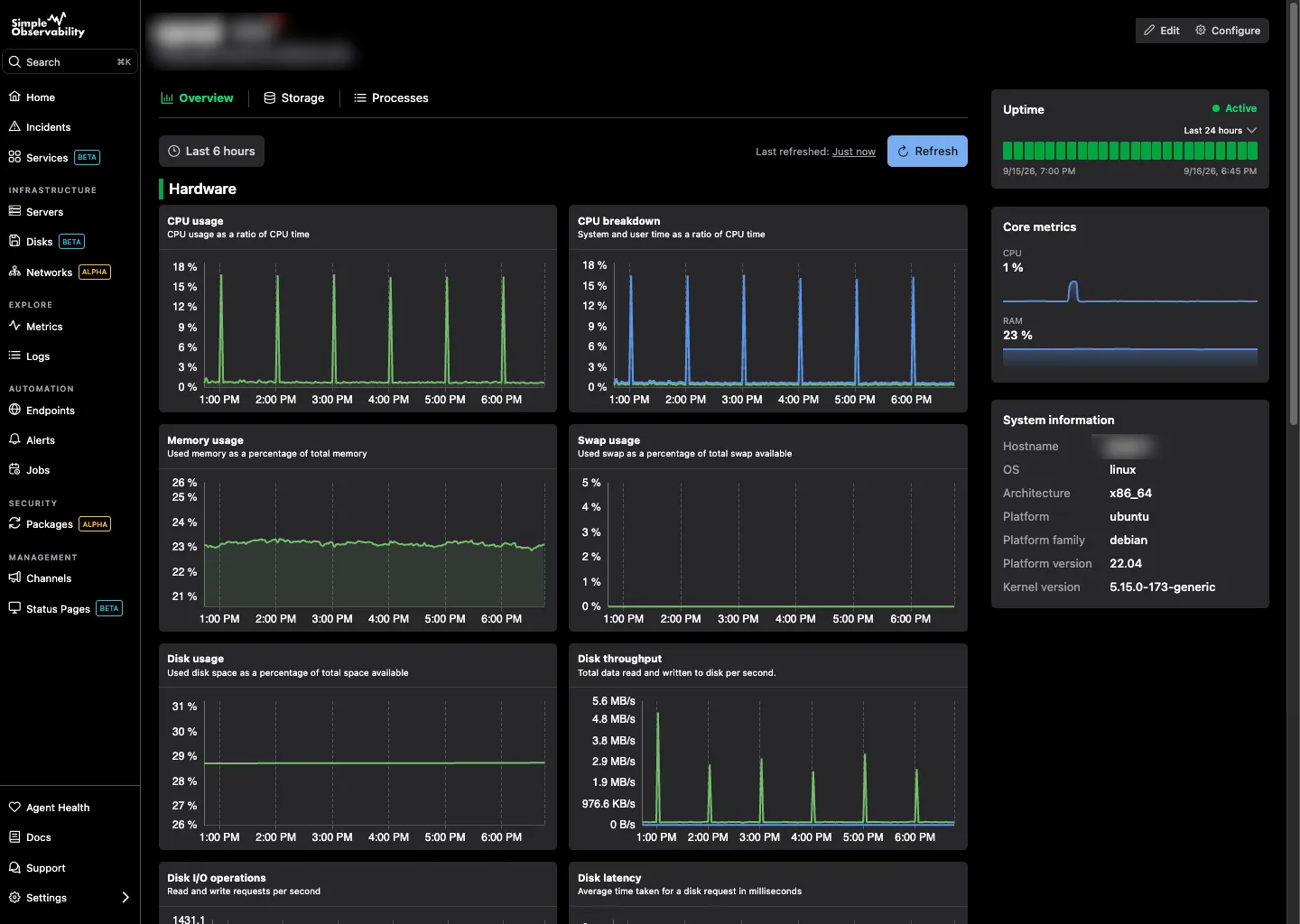
Simple Observability is built for teams that want the cron alert and the server context in one place. It bundles cron monitoring with server metrics, logs, and uptime checks in a single dashboard, at a fixed per-server price.
Key features
- Cron monitoring: Track execution, duration, and exit codes for scheduled jobs, not just heartbeat pings.
- Metrics and logs: CPU, disk, memory, and logs alongside the cron check.
- Hosted: The agent pushes data out over HTTPS, no inbound ports.
- Zero-config alerts: Sensible defaults from day one.
Simple Observability vs Healthchecks.io Where Healthchecks.io gives you only the heartbeat alert, Simple Observability gives you the heartbeat plus the metrics, logs, and exit-code context to diagnose the failure. You stop opening three tools to figure out why a cron run did not check in.
Pros
- All-in-one: Cron, metrics, logs, and uptime in one dashboard.
- Exit codes and duration: More than just “did it ping”.
- Predictable pricing: Flat fee per server.
Cons
- No free cron-only tier: Healthchecks.io has a free cron tier; Simple Observability is free for 1 server then $3/server.
- Not a dedicated cron tool: It is a broader platform that includes cron.
Best for: Teams that want the cron alert and the server context to act on it, in one tool.
Price
- Free: $0 for 1 server.
- Paid: $3/mo per server for unlimited servers.
- Custom: Volume discounts for large fleets.
2. Cronitor
Cronitor is a direct competitor to Healthchecks.io, focused on cron and heartbeat monitoring with added uptime checks. It is the closest like-for-like alternative on this list.
Key features
- Cron heartbeat monitors: Pings for scheduled job success and failure.
- Uptime checks: Also covers HTTP and TCP uptime.
- Alerting: Email, Slack, PagerDuty, and more.
- Telemetry: Captures duration and metrics around each run.
Pros
- Direct peer: Solves the same problem as Healthchecks.io, with a polished UI.
- Uptime included: A bit broader than Healthchecks.io.
- Telemetry: Duration and outcome per run, not just a ping.
Cons
- Smaller free tier: 5 monitors free vs Healthchecks.io’s 20.
- Paid: Pricing scales with monitors and uptime checks.
- Still single-purpose-ish: No server metrics or logs.
Best for: Teams that want a polished cron monitor with uptime and telemetry in one product.
Price Free for 5 monitors. Paid plans start around $10/month.
3. Dead Man’s Snitch
Dead Man’s Snitch is a focused cron job monitoring service. It is the other direct peer to Healthchecks.io in the heartbeat-only category.
Key features
- Cron heartbeats: Pings for scheduled job completion.
- Alerts: Email, Slack, PagerDuty, and more on missed pings.
- Schedules: Per-job cadence and grace periods.
Pros
- Focused: Does one thing well, like Healthchecks.io.
- Simple: Easy to wire into existing cron jobs.
Cons
- Limited free tier: Only 1 snitch free, unlike Healthchecks.io’s 20.
- Cron only: No uptime, metrics, logs, or telemetry.
- Narrower: Less feature surface than Cronitor or Better Stack.
Best for: Teams that want a focused, paid cron heartbeat monitor.
Price Free for 1 snitch. Paid plans start at $5/month for 3 snitches.
4. Better Stack
Better Stack is a monitoring and incident management platform that includes heartbeat checks similar to Healthchecks.io, plus status pages and logs.
Key features
- Heartbeat checks: Missed-ping alerts like Healthchecks.io.
- Status pages: Branded, hosted status pages.
- Structured logging: Centralized log search with alerting.
Pros
- Heartbeat plus status pages: A combination Healthchecks.io does not offer.
- Logs alongside heartbeats: Some context that Healthchecks.io does not provide.
- Polished UX: Clean, modern incident communication.
Cons
- Per-volume log pricing: Ingest is billed by volume if you use logs.
- Thin metrics: Infrastructure metrics are not its strength.
Best for: Teams that want heartbeat checks plus status pages and logs in one product.
Price Free tier available. Paid plans are usage-based.
5. Uptime Kuma
Uptime Kuma is a self-hosted, open-source uptime monitor. It includes a push (heartbeat) monitor type, which makes it a self-hosted alternative to Healthchecks.io for heartbeat checks.
Key features
- Push monitors: Heartbeat-style checks for cron jobs, similar to Healthchecks.io.
- Many monitor types: HTTP, TCP, ping, DNS, container, and push.
- Notifications: A wide range of channels.
- Status pages: Basic public status pages.
Pros
- Free and open source: No per-check pricing.
- Heartbeat included: The push monitor type covers cron jobs.
- Self-hosted: Full control.
Cons
- Self-hosted: You maintain the instance, including its uptime.
- Not cron-focused: Heartbeat is one monitor type among many, not the core product.
- No metrics or logs: Uptime only.
Best for: Self-hosters who want a free tool that can do heartbeat checks alongside uptime.
Price Free (open source).
6. HetrixTools
HetrixTools is a low-cost uptime and status page service. It is adjacent to Healthchecks.io (uptime, not cron), included here for teams whose real need is cheap uptime plus status.
Key features
- Uptime monitoring: HTTP, keyword, ping, and port checks.
- Status pages: Public, white-label status pages.
- Server monitoring: Basic resource metrics via a small agent.
Pros
- Cheap: Generous free tier and low paid plans.
- White-label status pages: Useful for MSPs.
- Managed: No self-hosting.
Cons
- No dedicated cron heartbeats: Unlike Healthchecks.io, it is not built for cron monitoring.
- Shallow metrics: Far less depth than a real monitoring platform.
Best for: Teams that want cheap uptime and status pages alongside their cron tool.
Price Free tier available. Paid plans start around $9.95/month.
7. UptimeRobot
UptimeRobot is a simple, managed uptime monitoring service. It is adjacent to Healthchecks.io (uptime, not cron), included for teams whose real need is simple managed uptime.
Key features
- Multiple check types: HTTP, keyword, ping, TCP port.
- Free tier: 50 monitors at 5-minute intervals.
- Status pages: Public status pages on paid plans.
Pros
- Dead simple: Set up a monitor in seconds.
- Free tier: Genuinely useful for small setups.
- Managed: No self-hosting.
Cons
- Heartbeat on paid only: Free tier excludes heartbeat checks; Healthchecks.io includes cron free.
- Uptime only: No metrics or logs.
Best for: Teams that want managed uptime alongside their cron tool.
Price Free for 50 monitors. Paid plans start around $10/month.
8. Upptime
Upptime is a free, open-source uptime monitor that runs on GitHub Actions and GitHub Pages. It is adjacent to Healthchecks.io, included for teams that want a free, zero-maintenance uptime tool.
Key features
- GitHub Actions powered: Checks run on a schedule inside a GitHub repo.
- Status page on GitHub Pages: A generated, hosted status page, free.
- Notifications: Slack, email, and more via GitHub Actions.
Pros
- Free forever: No per-monitor pricing, no server.
- Zero maintenance: GitHub runs the checks and hosts the status page.
Cons
- Uptime, not cron: No heartbeat cron monitoring.
- GitHub rate limits: Check frequency is limited by GitHub Actions scheduling.
- Requires a GitHub account: The whole system lives in a repo.
Best for: Open-source projects and teams that want a free, zero-maintenance uptime monitor with a status page.
Price Free (open source, runs on GitHub’s free tiers).
Conclusion
Healthchecks.io is a great, focused tool if your only problem is silent cron failures and you are happy to run it alongside other tools. The alternatives split into three groups: direct cron monitors (Cronitor, Dead Man’s Snitch), heartbeat-capable uptime tools (Uptime Kuma, Better Stack), and platforms that add the server context (Simple Observability).
- For cron plus metrics, logs, and uptime: Try Simple Observability. The alert and the context in one place.
- For a direct cron monitor: Cronitor is the closest polished peer, Dead Man’s Snitch the focused one.
- For a free, self-hosted heartbeat tool: Uptime Kuma covers push checks alongside uptime.
Pick the tool that gives you enough context to act. For a head-to-head breakdown, see our Healthchecks.io comparison page, and for the uptime angle, our UptimeRobot alternatives guide goes deeper.