
Site24x7 is an all-in-one monitoring suite from ManageEngine. It covers uptime, server, network, application, and cloud monitoring in one product, and its broad catalog appeals to organizations that want a single vendor for many monitoring needs.
The friction is legacy and pricing. The UI is dated and feature-dense, and many capabilities are billed as add-ons, so the headline price rarely matches the real bill. For teams that want a modern, instant dashboard without the bloat, Simple Observability gives you metrics, logs, and alerts out of the box at a fixed per-server price.
This article covers the best alternatives to Site24x7 in 2026. We start with what Site24x7 does well and where it falls short, then the criteria for evaluating a replacement, and finally a comparison of each option. If you are comparing other tools, see our Datadog alternatives and Better Stack alternatives guides.
Quick summary
| Tool | Best For | Price Model |
|---|---|---|
| Simple Observability | Modern, zero-config | $3 / mo / server |
| Datadog | Full-stack observability | $15+ / host / month |
| New Relic | App Performance (APM) | Usage based ($0.40/GB) |
| Better Stack | Status pages & on-call | Usage based |
| Netdata | Real-time single-node | Free / ~$4.50/node/mo |
| Zabbix | Network / On-Prem | EUR 50 / mo (Cloud) |
| PRTG | Windows / network IT | Per-sensor |
| Checkmk | Complex IT / Hybrid | ~EUR 7.20 / host / month |
Site24x7 Overview
Known for
Site24x7 is best known for being a broad all-in-one suite. One product covers website, server, network, application, cloud, and real-user monitoring, which is attractive for organizations that want one vendor and one bill for many monitoring types.
Key features
- Broad suite: Uptime, server, network, app, cloud, and RUM in one product.
- Large monitor catalog: A wide range of monitor types.
- Status pages: Included.
- MSP support: Multi-tenancy and client portals for resellers.
Why look for a Site24x7 alternative?
While Site24x7 is broad, several issues push teams to look elsewhere.
1. Legacy bloat
The UI is dated and feature-dense. Navigation relies on legacy patterns, and the breadth means a lot of surface area to learn. Compared to modern monitoring UIs with contextual dashboards, it creates friction.
2. Add-on pricing
Many capabilities are billed as add-ons. The headline price rarely matches the real bill, and the per-monitor model can stack up in a way that is hard to predict, similar to other suite tools.
3. Depth vs breadth tradeoff
Because it covers so many categories, individual modules are not as deep as dedicated tools. The server monitoring is not as rich as a dedicated infrastructure platform, and the APM is not as deep as New Relic or Datadog.
4. Cloud-native fit
The suite grew from a website monitoring product and retains that lineage. Cloud-native and container environments are supported but not the natural center of the product.
How to choose an alternative?
When comparing Site24x7 competitors, focus on what actually matters for your stack.
- Breadth vs depth: Do you want one vendor for everything, or a focused tool that is better at the part you care about?
- Pricing clarity: Decide whether add-on pricing works for you or whether a fixed, predictable price is better.
- UI modernity: If a dated UI is the pain, prioritize modern, contextual dashboards.
- Cloud-native fit: If you run containers or cloud infrastructure, check whether the tool is built for it.
8 Best Site24x7 Alternatives
1. Simple Observability
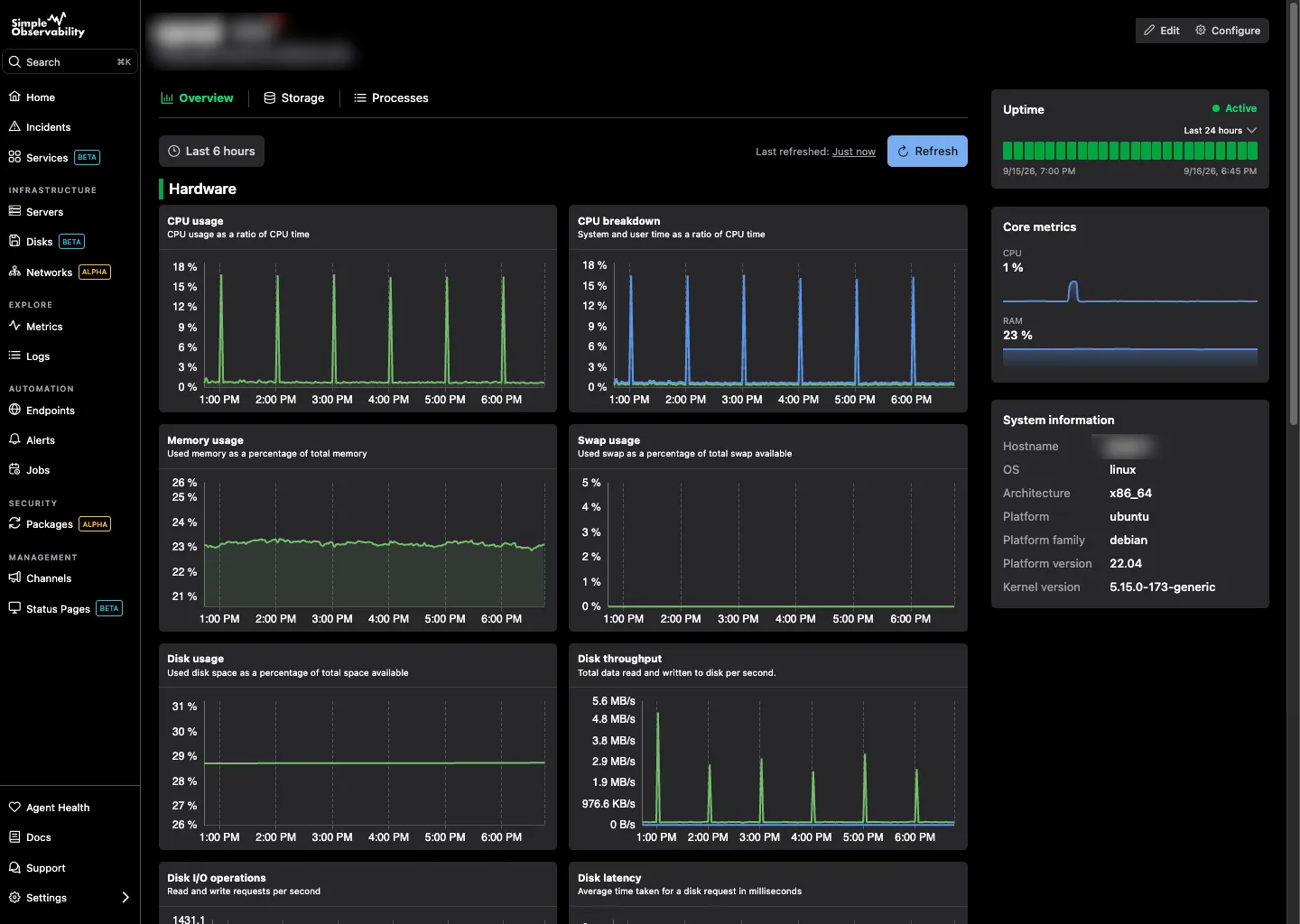
Simple Observability is built for teams that want a modern, instant dashboard without the legacy bloat. It combines metrics, logs, and alerts in one view, installed with a single command, at a fixed per-server price.
Key features
- Unified dashboard: CPU, memory, disk, and network alongside logs.
- Zero-config alerts: Sensible defaults from day one, no add-on configuration.
- Lightweight agent: An open-source agent installed with one command.
- Modern UI: Contextual dashboards instead of legacy, feature-dense screens.
Simple Observability vs Site24x7 Where Site24x7 is a broad suite with add-on pricing and a dated UI, Simple Observability is a focused infrastructure platform with a fixed per-server price and a modern interface. You give up breadth (no RUM, no deep network), but you get clarity and speed.
Pros
- Predictable pricing: Flat fee per server. No add-on stacking.
- Modern UI: Fast, contextual, and easy to navigate.
- Zero-config: Works out of the box.
Cons
- Narrower scope: No RUM, no deep network monitoring, no APM.
- Not an MSP suite: No client portals or multi-tenancy for resellers.
Best for: Teams that want modern infrastructure monitoring without the legacy bloat and add-on pricing.
Price
- Free: $0 for 1 server.
- Paid: $3/mo per server for unlimited servers.
- Custom: Volume discounts for large fleets.
2. Datadog
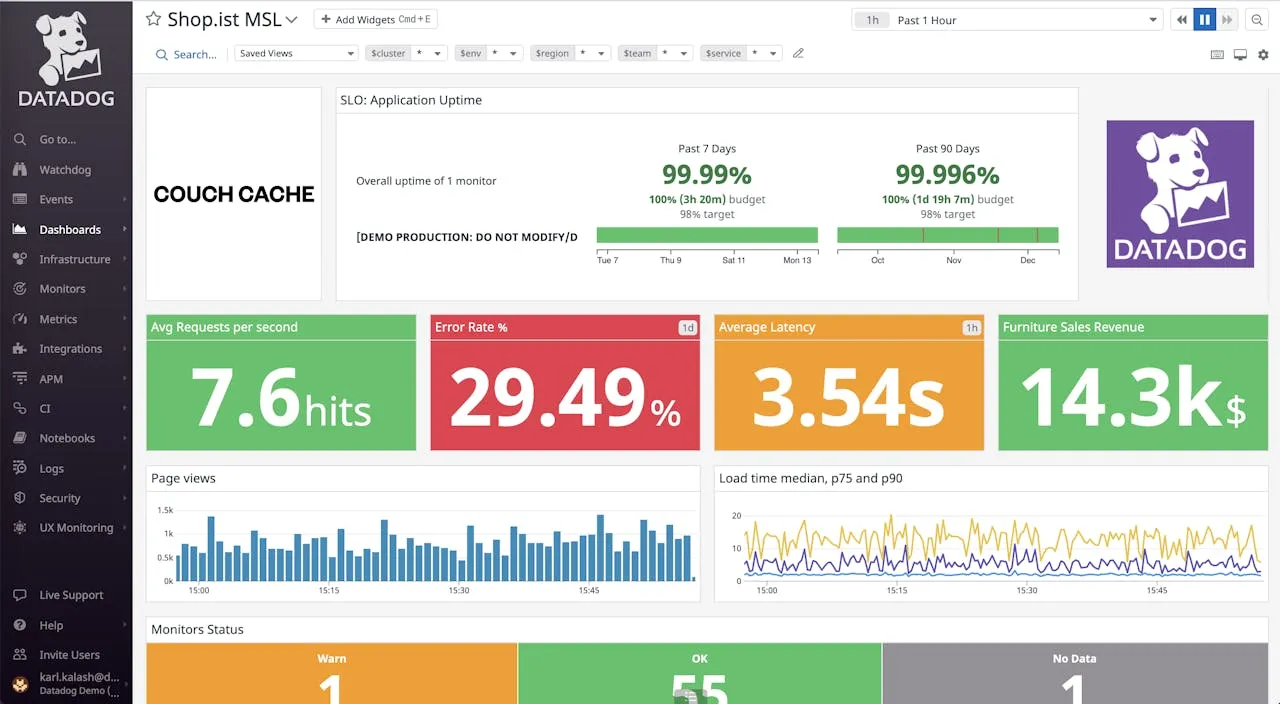
Datadog is the broadest observability platform on this list. It covers infrastructure, APM, logs, security, and more, with a far more modern UI than Site24x7.
Key features
- Full-stack observability: Metrics, logs, and traces in one place.
- 400+ integrations: Broad cloud and SaaS coverage.
- RUM and synthetic: Covers the website monitoring Site24x7 started with.
Pros
- Polished UI: Modern, fast, and intuitive.
- Deep metrics and APM: Far deeper than Site24x7’s modules.
Cons
- Expensive: Per-host plus per-feature billing adds up fast.
- Add-on model: Like Site24x7, features are billed separately, so the headline price is not the real price.
Best for: Large teams that want breadth and depth and can absorb the cost.
Price Infrastructure starts at $15/host/mo. Logs, APM, and custom metrics billed separately.
3. New Relic
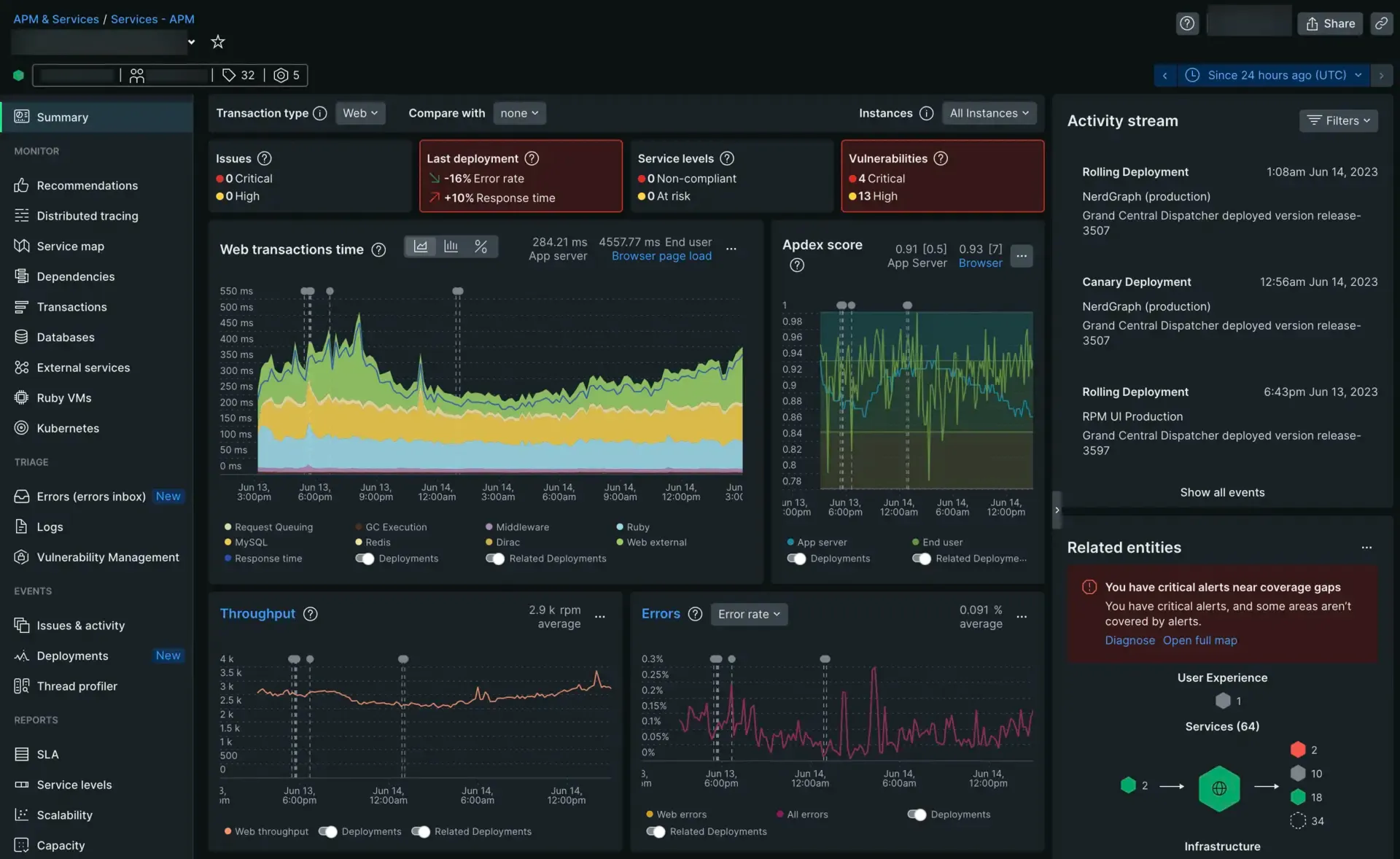
New Relic is an APM-first observability platform that also covers infrastructure, logs, and synthetic monitoring. It is a closer match to Site24x7’s broad scope than most tools here.
Key features
- Deep APM: Code-level tracing.
- Synthetic checks: Uptime and website monitoring.
- Generous free tier: 100 GB/month of ingest.
Pros
- Unified platform: Metrics, logs, and traces in one place.
- Free tier: Enough for small teams.
- Modern UI: Less legacy feel than Site24x7.
Cons
- Per-user pricing: Full access requires paid seats.
- Usage-based surprises: Ingest spikes move the bill.
Best for: Development teams that need APM and synthetic checks together.
Price Free for 100 GB/month. Paid plans start at $0.40/GB ingested plus per-user seat fees.
4. Better Stack
Better Stack is a monitoring and incident management platform that combines uptime checks, structured logging, and branded status pages.
Key features
- Status pages: Branded, hosted status pages out of the box.
- Uptime monitoring: Heartbeat and HTTP checks with on-call alerting.
- Structured logging: Centralized log search with alerting.
Pros
- Polished UX: Clean, modern incident communication, a contrast to Site24x7’s dated UI.
- Status pages included: A strong feature.
- On-call workflows: Scheduling and alert routing.
Cons
- Per-volume log pricing: Ingest is billed by volume.
- Thin metrics: Infrastructure metrics are not its strength.
Best for: Teams that prioritize status pages and on-call workflows.
Price Free tier available. Paid plans are usage-based.
5. Netdata
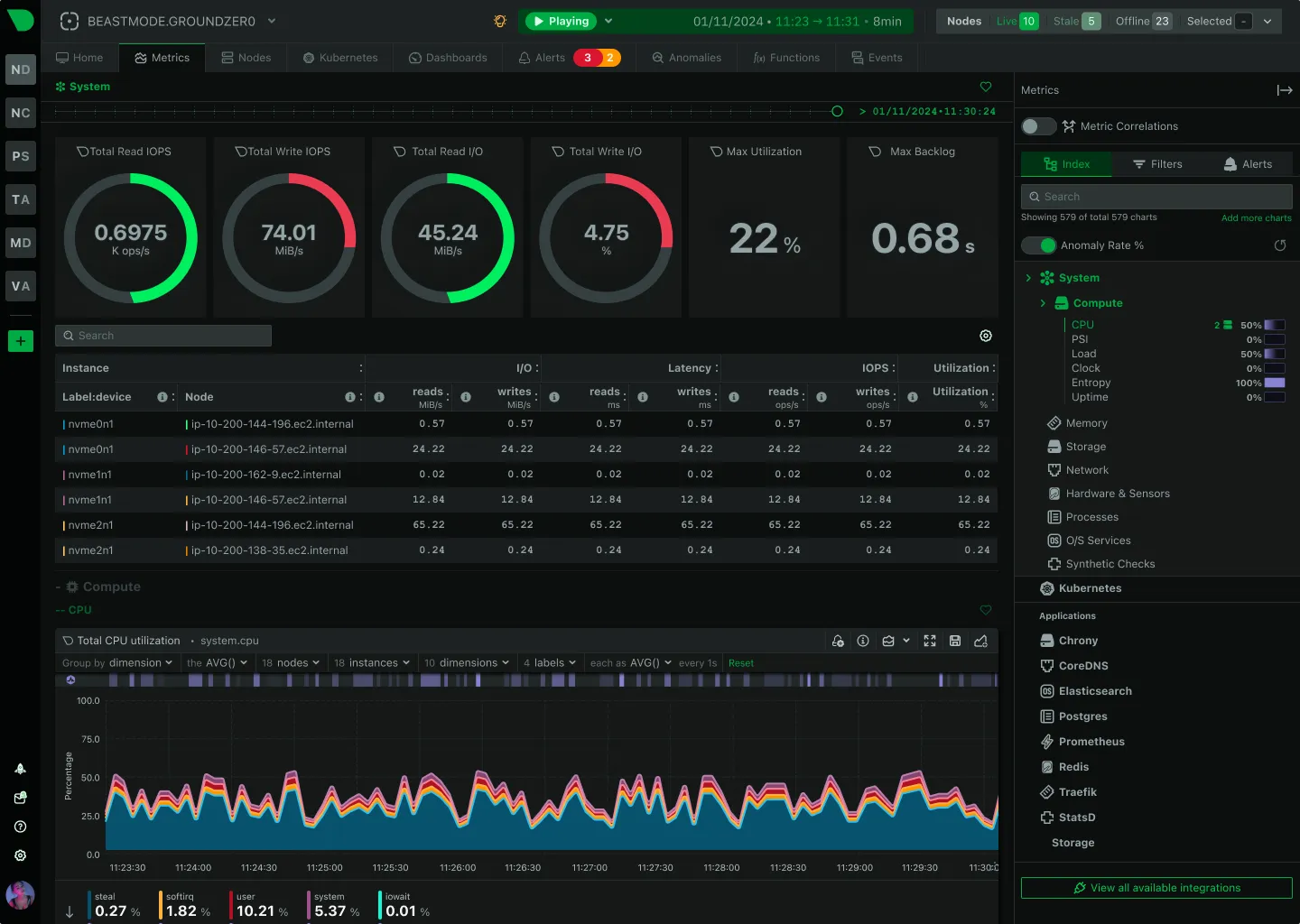
Netdata focuses on real-time, high-resolution single-node monitoring with per-second granularity. It is a modern, agent-first alternative to Site24x7’s legacy suite model.
Key features
- Real-time metrics: Second-level granularity for immediate feedback.
- Unsupervised ML: Built-in anomaly detection without manual thresholds.
- Auto-discovery: Automatically detects services and apps on the host.
Pros
- Instant visibility: Hundreds of charts the moment you install the agent.
- No config: Auto-detects everything, unlike Site24x7’s per-monitor setup.
- Modern UI: A contrast to Site24x7’s dated interface.
Cons
- Scaling complexity: Fleet-wide aggregation needs more work than centralized tools.
- Higher resource usage: On-host ML and high-res data cost CPU and RAM per node.
- No status pages: Not its focus.
Best for: Teams that want instant, high-resolution visibility into individual servers without legacy UI.
Price Free for up to 5 nodes. Business plans start around $4.50/node/month.
6. Zabbix
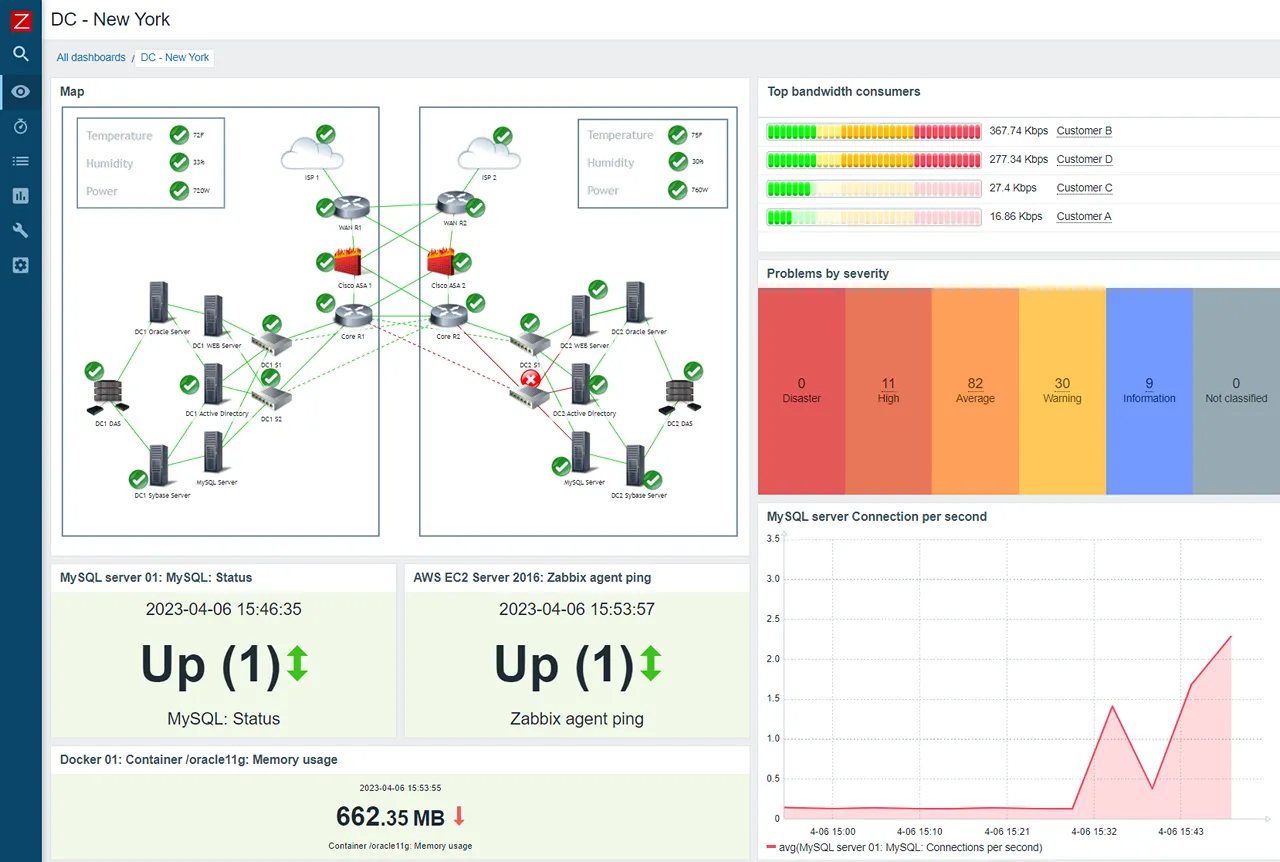
Zabbix is a mature, enterprise-grade open-source platform focused on infrastructure and network monitoring. It is a heavier, on-prem alternative to Site24x7’s SaaS model.
Key features
- Agent and agentless: SNMP, JMX, IPMI, or its own agent.
- Push and pull: Polling and trapping.
- Granular permissions: Strong multi-tenancy.
Pros
- Proven: Battle-tested for decades.
- Open source: No feature-gated tiers or add-on pricing.
- Broad infrastructure coverage: Switches, servers, network gear.
Cons
- Complexity: Verbose XML configuration.
- Self-hosted: You run the server and database.
- Dated UI: Similar legacy feel to Site24x7, though improving.
Best for: NOCs and on-prem-heavy organizations.
Price Free to self-host. Zabbix Cloud starts at EUR 50/month.
7. PRTG
PRTG Network Monitor is a Windows-based, all-in-one network monitor. It is a direct competitor to Site24x7 in audience, aimed at Windows-centric IT departments.
Key features
- Sensor-based: Each metric is a sensor, covering a wide range of types.
- All-in-one: Network, server, and app monitoring in one product.
- Auto-discovery: Scans the network to suggest sensors.
Pros
- Approachable: One installer for a broad set of monitoring.
- Good network coverage: Strong for SNMP and network gear.
Cons
- Per-sensor pricing: Like Site24x7’s add-ons, costs scale with usage.
- Windows core: Runs on a Windows server, a constraint for Linux shops.
- Dated UI: Functional but not modern.
Best for: Small, Windows-centric IT environments.
Price Free for up to 100 sensors. Paid plans are per-sensor.
8. Checkmk
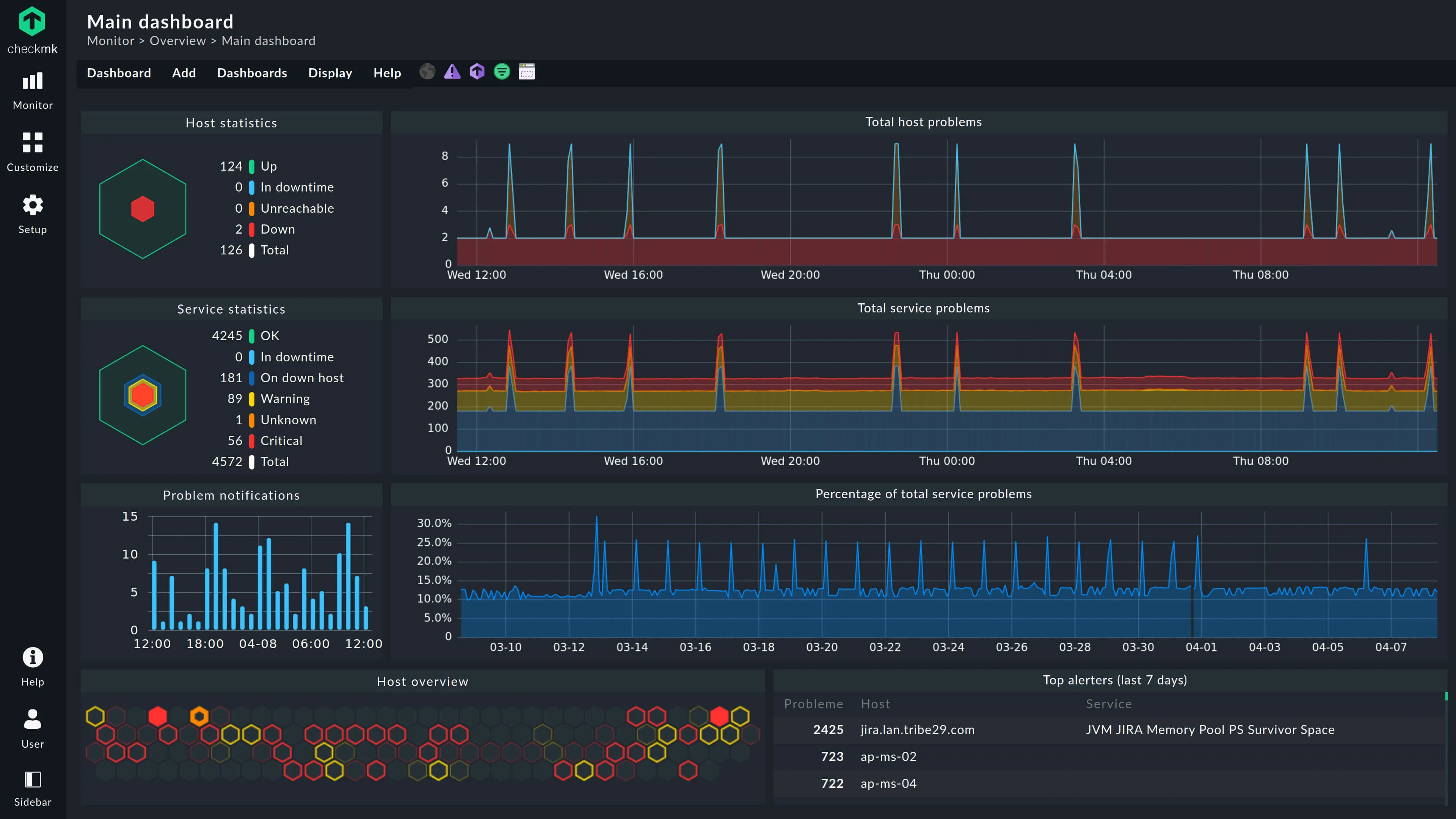
Checkmk is a comprehensive monitoring tool that excels in hybrid IT. It bridges Nagios-style checks and modern metric collection, with auto-discovery that reduces manual config.
Key features
- Hybrid monitoring: Bare metal, switches, and Docker containers.
- Automatic service discovery: Scans hosts and configures checks.
- 2,000+ plugins: A massive library of integrations.
Pros
- All-in-one: State checks and metric performance.
- Auto-discovery: Less manual setup than Site24x7’s per-monitor model.
Cons
- UI feels dated: Functional but cluttered, a similar issue to Site24x7.
- Service-based pricing: Like Site24x7’s add-ons, can be hard to predict.
Best for: Sysadmins managing mixed infrastructure.
Price Open Source edition is free. Enterprise starts at ~EUR 2,280/yr for 3,000 services. SaaS starts at ~EUR 7.20 per host/month.
Conclusion
Site24x7 is a reasonable choice if you want one vendor for many monitoring types and accept a dated UI and add-on pricing. But for teams that want a modern, predictable platform, the breadth often comes at the cost of depth and clarity.
- For modern and predictable: Try Simple Observability. Fixed per-server price, no add-ons, no legacy UI.
- For full observability and budget to match: Datadog is the broadest, most polished option.
- For status pages and on-call: Better Stack is the modern incident alternative.
Pick the tool that matches the part of the suite you actually use. For a head-to-head breakdown, see our Site24x7 comparison page, and for another angle, our PRTG alternatives guide covers the Windows-centric side.