





- For an all-in-one platform that works out of the box, without maintaining complex setups or stitching together fragmented SaaS subscriptions, Simple Observability is the top choice. Free for one server, then $3/mo per server.
- For users who need extreme flexibility and a vast feature set and don't mind a complex setup, Checkmk and Zabbix are excellent.
- Netdata is perfect for real-time, per-second monitoring, with a dedicated $90/year plan for homelabs. Nagios offers a highly scalable and customizable enterprise option, though its interface can feel outdated.
Server monitoring isn’t a luxury. It matters a lot regardless of the services you’re actually running, and knowing what server monitoring covers makes choosing a tool much easier.
If you’ve ever had to SSH into a server at 2 am to diagnose why a service went down, you know the pressure. Visibility is critical in those moments.
What are the best server monitoring tools available? Here are the 5 best monitoring tools on the market today. For head-to-head breakdowns, see our Netdata vs Zabbix, Zabbix vs Checkmk, and Netdata vs Prometheus comparisons. For tool-specific roundups, see our Netdata alternatives, Zabbix alternatives, and Nagios alternative guides.
Best server monitoring tools summary
| Tool | Best for | Price |
|---|---|---|
| Simple Observability | Solo IT managers and digital agencies | Free for 1 server, then $3/mo per server |
| Checkmk | Large, complex environments | Free (Community, ~100 hosts) / from $275/mo (Pro) |
| Netdata | Real-time, per-second visibility | Free (5 nodes) / $4.50 per node/mo |
| Zabbix | Scale on a zero license budget | Free (self-hosted) / cloud from $50/mo |
| Nagios | Extensibility via plugins | Free (7 nodes) / $2,595 per 100-node license |
What to monitor?
Before diving into tools, it’s important to understand what you should actually be monitoring. Servers produce a huge amount of data, but focusing on the right metrics will give you early warnings when something is going wrong. Here’s a rundown of the most useful aspects to keep an eye on.
Uptime
The most basic yet critical metric: is your server online? Uptime monitoring ensures you know immediately when a server or service becomes unreachable. Even a few minutes of downtime can result in lost revenue, broken user trust, or cascading failures across your infrastructure.
Pairing uptime checks with alerting ensures you’re notified the second something goes down, not when your users report it.
System core metrics
At the heart of every server are the fundamental resources:
- CPU usage: High or sustained CPU consumption can slow down processes, indicate runaway tasks, or even point to malware.
- Memory usage: Running out of RAM leads to performance bottlenecks and, in extreme cases, system crashes or swapping that drags everything down.
- Disk usage and I/O: A full disk or overloaded I/O pipeline can silently cripple your system. Monitoring both space and throughput helps you prevent downtime.
Think of these as the foundation of your server’s health. If they’re compromised, everything else on top will suffer.
Network metrics
Your server’s network activity is another critical piece of the puzzle. A sudden spike in bandwidth (inbound or outbound) can mean many things:
- A Distributed Denial of Service (DDoS) attack.
- A misconfigured application leaking traffic.
- Data being exfiltrated without your knowledge.
By keeping a close watch on traffic volume, connection counts, and latency, you gain visibility into both performance issues and potential security incidents.
Web server metrics
If your server is hosting applications or websites, web traffic indicators are indispensable:
- Requests per Second (RPS): This shows how much load your server is handling at any given time. Sudden jumps can indicate popularity or abuse.
- Error rate (4xx/5xx responses): A rising error rate often points to broken code, overloaded resources, or external factors like a failing dependency.
Together, these metrics give you a clear picture of what’s happening behind the scenes. They help you move from reactive firefighting (“the site is down!”) to proactive monitoring (“we see errors spiking, let’s fix it before users complain”).
Reviews
Simple Observability
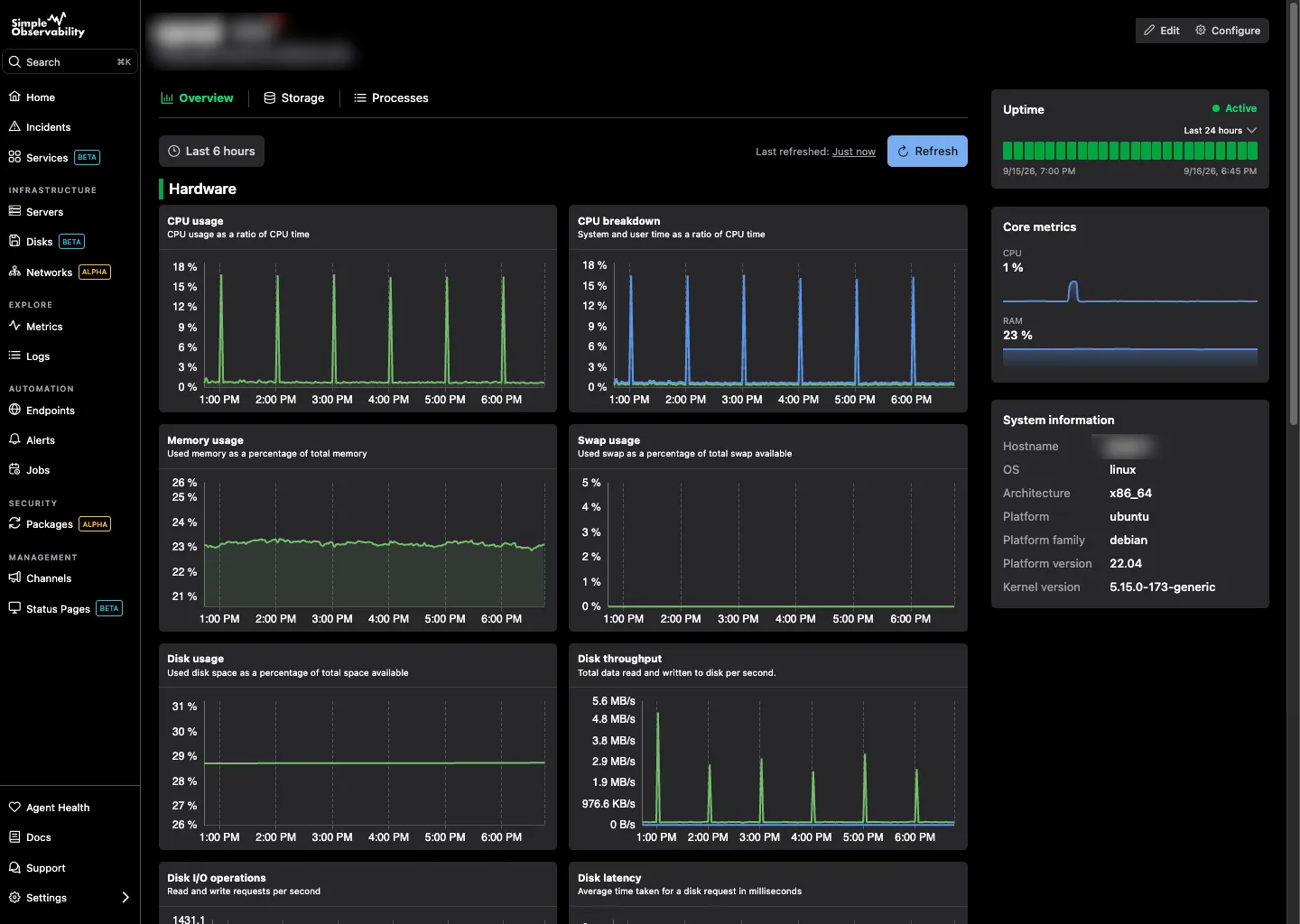
Simple Observability is an all-in-one infrastructure monitoring platform for solo IT managers and digital agencies. It gives them complete visibility and health tracking across their entire infrastructure from a single central dashboard, without hours spent maintaining complex monitoring setups or paying for multiple fragmented SaaS subscriptions.
Everything comes pre-configured with predefined defaults. The open-source agent installs in one command, configuration happens through a clean web UI, and metrics, logs, and alerts land in the same view from the first minute. It’s the difference between an out-of-the-box monitoring stack and a project that needs setting up.
It offers ready-to-use reports and alerts, allowing users to get immediate insights and define alert conditions in seconds.
Its open-source agent is transparent, auditable, and designed to work on a wide range of Linux distributions.
It also fits naturally in a homelab, where it replaces a DIY Prometheus stack with something you set up once and forget about.
Best for: Solo IT managers and digital agencies that need their infrastructure watched without becoming the person who maintains the monitoring.
Key features
- One-command installation: The open-source agent can be installed with a single command, significantly reducing setup time and complexity.
- Unified monitoring: Combines metrics and logs in a single, unified system, providing a holistic view of server performance.
- Web UI configuration: All configurations, from metrics to alerts, are managed through an intuitive web interface, eliminating the need for complex configuration files.
- Mobile-friendly: Offers a Progressive Web App (PWA) to monitor infrastructure and receive alerts from anywhere.
Pros
- Instant, out-of-the-box setup: The stack comes fully pre-configured with predefined defaults, so you’re up and running in seconds with zero manual setup.
- Transparent pricing: Simple Observability offers a clear, fixed-price model with no usage-based surprises, which can be a significant advantage over competitors.
- Open-source agent: The agent’s open-source nature provides transparency and allows users to audit the code.
Cons
- Limited customization: While the simplicity is a pro, it may also be a con for advanced users who require more granular control and customizability beyond the built-in features.
Price
Simple Observability offers a free plan and simple per-server pricing:
- Free: one server, 50 metrics, low log volume.
- Paid: $3 per month per server, 100 metrics per server, high log volume, unlimited servers.
- Custom: volume discounts and custom retention for large infrastructures.
Checkmk
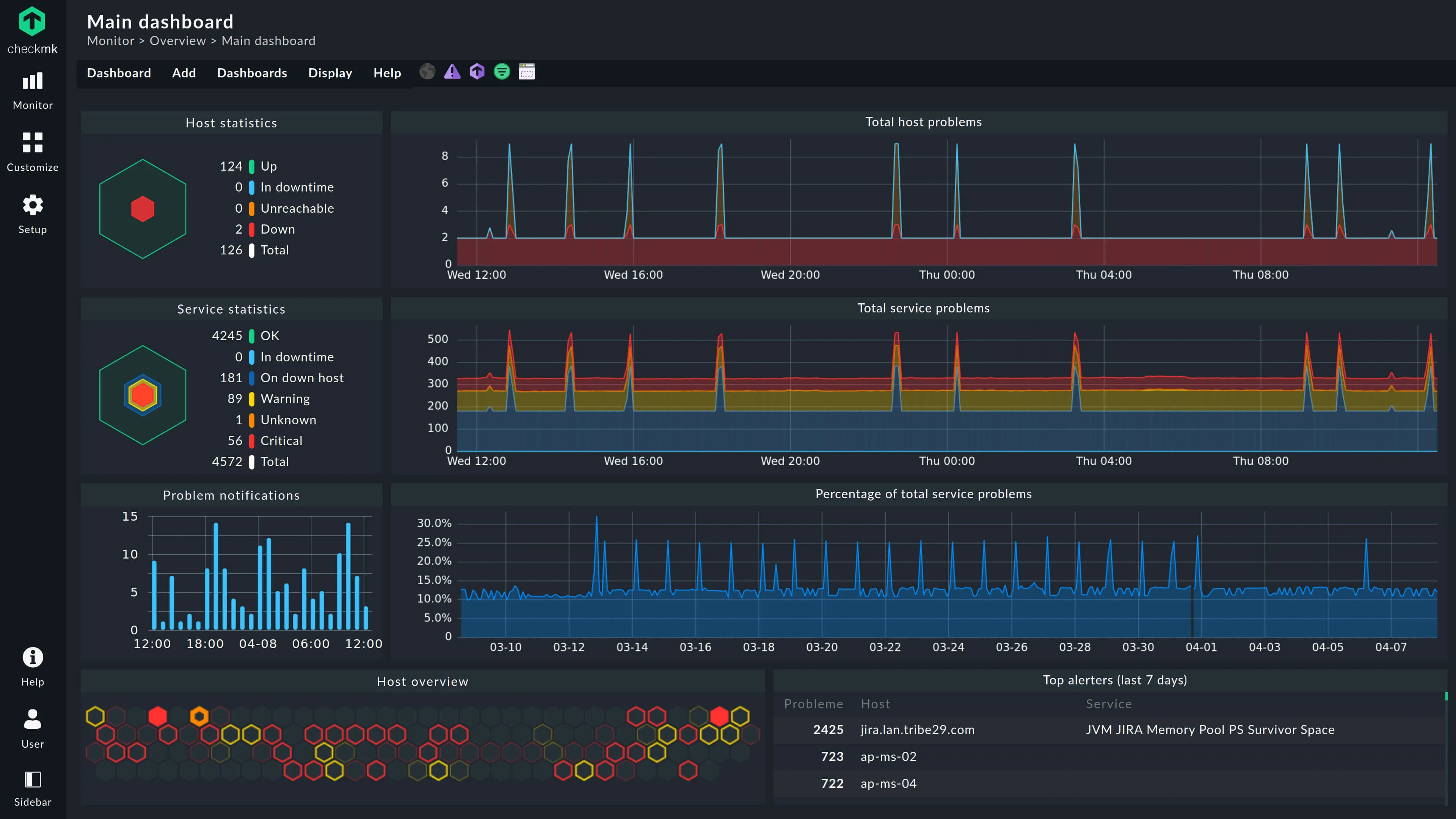
Checkmk is a comprehensive, open-source monitoring platform for applications, servers, and networks, both on-premises and in the cloud. It is designed to effortlessly monitor everything from the simplest to the most complex IT environments.
Checkmk features over 2,000 monitoring plugins for a wide range of devices, including servers, switches, databases, and web servers. Its C++ core keeps data in memory and handles hundreds of thousands of checks per minute on modest hardware, and its rule-based engine automatically inventories hosts and applies monitoring rules from tags and labels.
The free Community Edition is self-hosted with a limited feature set and supports both agent-based and agentless monitoring.
Checkmk can also automatically discover and map your network.
Best for: Large, mixed environments where one platform should cover servers, networks, and applications at once.
Key features
- Automatic service discovery: Automatically detects all relevant components on a host and recommends suitable metrics and thresholds for monitoring.
- Rule-based automation: Monitors new hosts and services through rules compiled from host tags and labels, drastically reducing manual configuration once mastered.
- Visualization: Features modern, customizable dashboards, graphic maps.
Pros
- Comprehensive: Monitors a wide range of IT components, from cloud services to on-premises systems, with a vast library of over 2,000 plugins.
- Flexible: Supports agent-based and agentless monitoring, and is highly customizable and extensible.
- Automated: Reduces manual effort with features like auto-discovery, host lifecycle management, and a powerful REST API.
Cons
- Learning curve & difficult configuration: While powerful, the platform can have a steep learning curve. Some users find its configuration complex, particularly for advanced features.
Price
Checkmk prices by the number of monitored services, not hosts, and a typical host generates 30 to 50 services:
- Community Edition: free, supports roughly 100 hosts.
- Pro (self-hosted): from $275/month, billed annually (about $2.75 per host).
- Checkmk Cloud (SaaS): about $290/month, with usage measured in services.
Budget carefully: the service-based model makes costs grow with everything your machines actually run.
Netdata
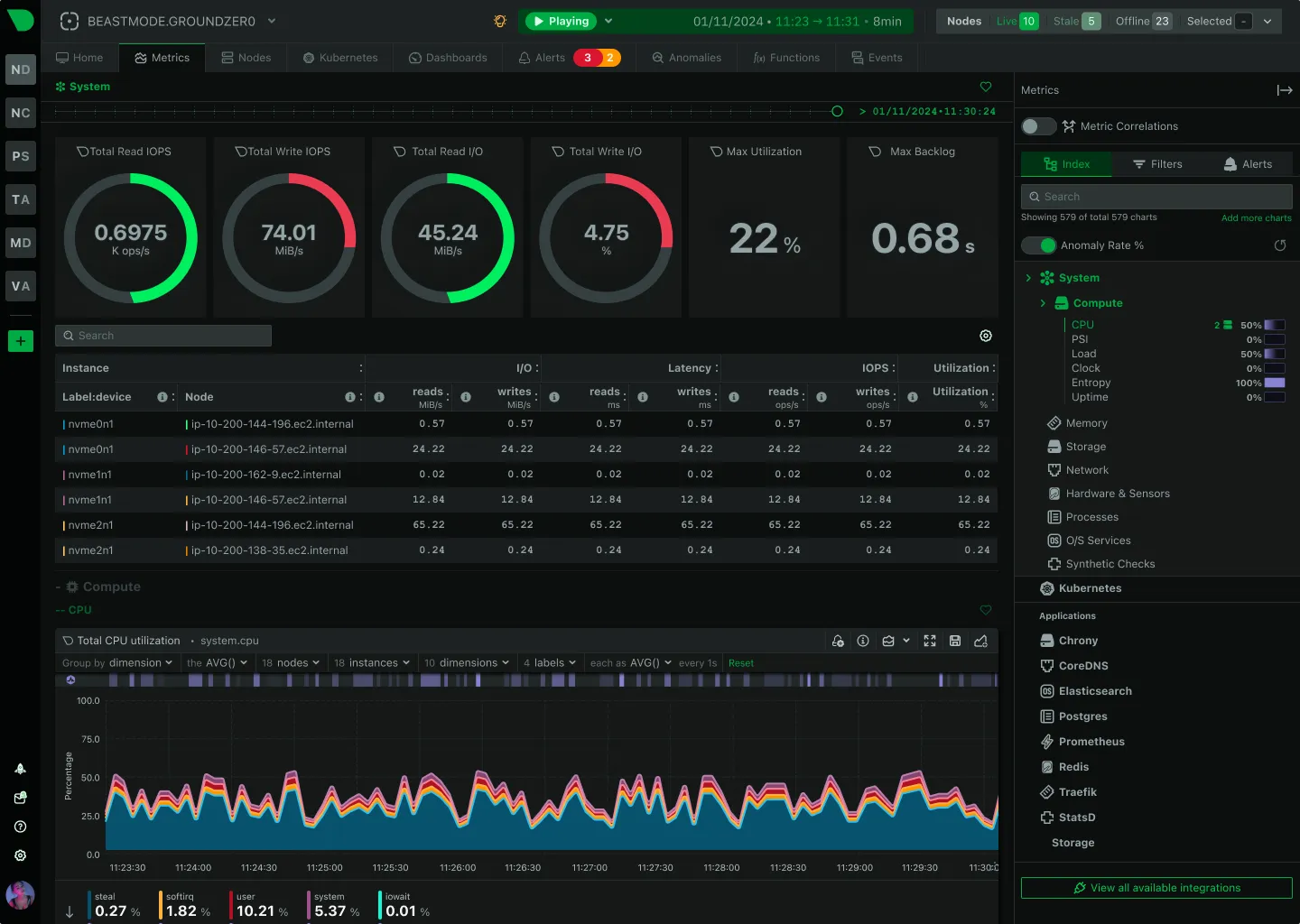
Netdata is an open-source, real-time performance monitoring and troubleshooting platform for systems and applications. It uses an edge-first design: every node collects and stores its own metrics locally, at per-second resolution, without shipping everything to a central database first. The result is extremely granular, real-time data with no central storage to provision and no backhaul bandwidth to pay for.
Netdata offers an all-in-one integrated observability solution, covering metrics, logs, synthetic checks, and alerts.
It features machine-learning-based anomaly detection and provides clear, actionable insights without requiring extensive data science knowledge.
The platform’s automatic discovery and pre-configured alerts reduce manual setup, enabling a rapid time-to-value for teams.
Best for: Real-time, per-second visibility into individual machines, from a single server to a large fleet.
Key features
- Real-time, high-resolution data collection: Gathers metrics every second, providing instant feedback with low latency.
- Machine-learning-based anomaly detection: Utilizes unsupervised machine learning to automatically learn workload patterns and spot anomalies.
- Edge storage: Metrics stay on each node, so your data lives on your infrastructure.
Pros
- Instant time-to-value: Automatic discovery of data sources and pre-configured alerts allow for immediate use upon installation.
- Data privacy: Metrics are stored on-premise, ensuring they remain on the user’s infrastructure.
Cons
- Cloud dependency for multi-node views: The agent’s local dashboard covers a single node, and features like RBAC and SSO live in the cloud plans. The free tier covers 5 nodes.
- Frequent agent updates: The release cadence is fast, which some teams find noisy to keep up with.
Price
- Free tier: up to 5 nodes, including 1 custom dashboard.
- Business: $4.50 per node per month, unlimited metrics, logs, and retention.
- Homelab: $90 per year for unlimited nodes on non-commercial setups.
Zabbix
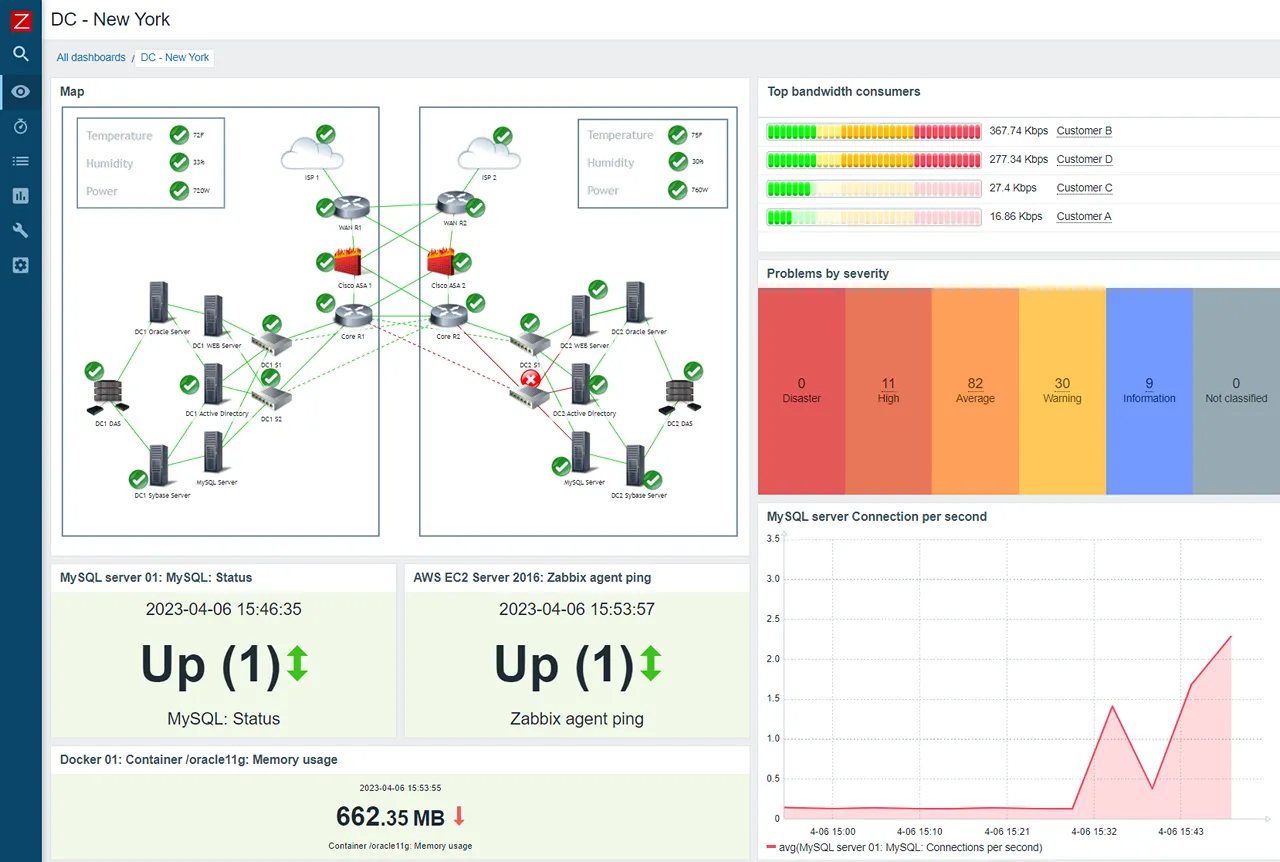
Zabbix is an open-source, enterprise-level software for monitoring various IT components, including networks, servers, virtual machines, and cloud services. Designed to handle large-scale environments.
One of Zabbix’s key strengths is its ability to collect data from virtually any source using a wide range of protocols and custom methods. Its distributed architecture scales through proxies that offload polling in remote locations. The platform’s robust alerting system offers multiple channels and escalation schemes, ensuring critical issues are addressed promptly.
Best for: Large, distributed fleets on a zero license budget, with an operations team to run it.
Key features
- Advanced problem detection: Utilizes intelligent thresholds, trend prediction, and machine learning to automatically detect anomalies and classify problems with multiple severity levels.
- Flexible alerting: Supports a variety of notification channels, such as email, SMS, and instant messaging, with customizable messages and escalation scenarios.
Pros
- High scalability: The distributed monitoring architecture, supported by Zabbix proxies, allows unlimited scalability to monitor thousands of devices across multiple locations.
- No vendor lock-in: 100% open source, no paid software edition, and no node limits on the self-hosted version.
Cons
- Steep learning curve: The complexity and extensive features of Zabbix can be challenging for newcomers, and users often describe the configuration as “menus on menus”.
- Database maintenance: The central relational database that powers Zabbix needs regular care (vacuuming, indexing) as history data grows, or performance degrades.
Price
- Self-hosted: completely free, no node limits (GPL license).
- Zabbix Cloud: managed offering starting at $50/month (Nano tier), scaling with ingestion volume.
Nagios
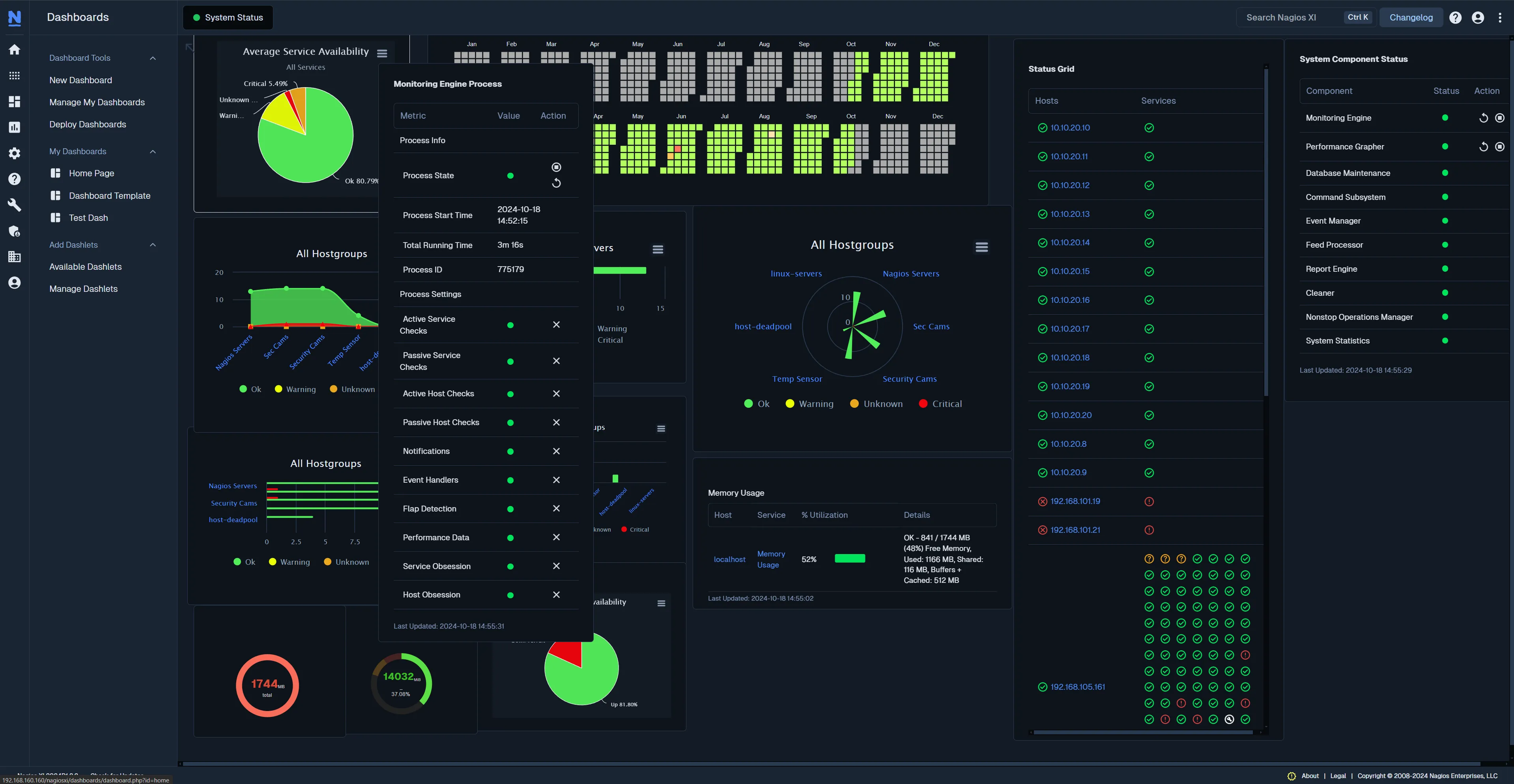
Nagios is a comprehensive, enterprise-level infrastructure monitoring solution that provides extensive monitoring of critical IT components, applications, and systems. Built on the powerful Nagios Core 4 monitoring engine, it is designed to be highly scalable and effective for organizations of all sizes, from small businesses to large enterprises.
The platform offers a centralized view of monitoring data and proactive alerts to preemptively address infrastructure issues. With a customizable GUI, configuration wizards, and multi-tenant capabilities, it is designed to simplify administration and provide a streamlined, intuitive user experience. Nagios XI’s functionality can be extended with thousands of community-developed and third-party add-ons from the Nagios Exchange, along with APIs for integration with other applications.
Best for: Organizations that need a proven, plugin-extensible system and have the staff to configure and maintain it.
Key features
- Customizable and extensible: Offers a customizable GUI and an open architecture with 20+ years of community add-ons and APIs for integration.
- Configuration wizards: Simplifies the setup process for monitoring new devices and services.
Pros
- Extremely flexible: The platform’s extensive plugin framework and APIs make it highly adaptable to various monitoring needs.
- Scalability: Built on Nagios Core 4, it is designed for efficient, scalable monitoring of large and distributed environments.
Cons
- Steep learning curve: The initial setup and configuration are often considered complex, and applying configuration changes on large setups can be slow.
- Outdated interface: Some users find the web UI to be cluttered and less modern compared to competitors.
Price
- Free edition: up to 7 nodes.
- Standard: from $2,595 for a 100-node license (one-time cost, annual maintenance renewals for support and updates).
- Nagios Core: the open-source engine underneath is free with no limits.
Conclusion
Choosing the right server monitoring solution depends entirely on your specific needs and technical comfort level.
If you manage infrastructure on your own or for clients, and you’d rather not maintain the monitoring itself, Simple Observability stands out.
Its single central dashboard, one-command installation, and pre-configured defaults deliver an instant monitoring stack: no steep learning curve, no complex configuration files, and no stitching together separate subscriptions for metrics, logs, and uptime.
If your environment is large and complex, devices and servers might be spread across multiple locations. Checkmk and Zabbix offer the power and flexibility needed to manage extensive infrastructure. Their steep learning curves are a trade-off for their massive scalability and advanced features.
For those focused on real-time data and a proactive approach to issue detection, Netdata provides a unique and powerful solution. Finally, Nagios remains a reliable, highly customizable choice for large enterprises that need a proven, scalable system.
Ultimately, choosing the right tool is about finding the sweet spot between functionality and usability that aligns with your operational goals and team’s skills.